Auto Pass Through Parts – Quick Reference Guide
What Is Auto Pass Through Parts?
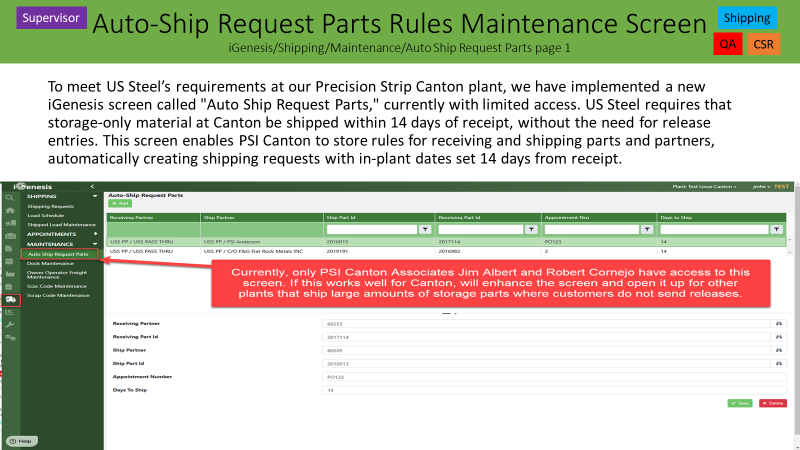
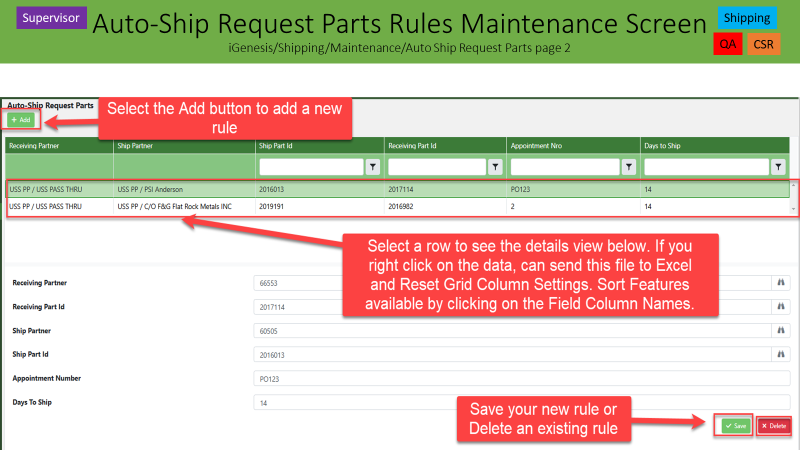
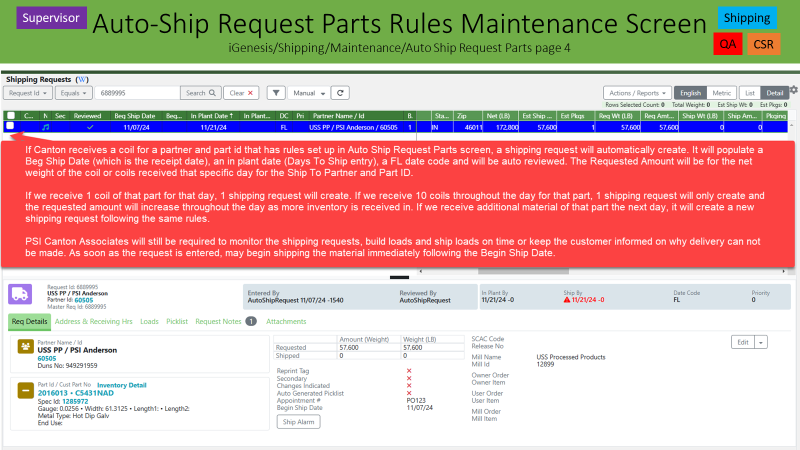
The Auto Pass Through Parts screen automatically moves inventory from one Partner/Part combination to another and can automatically create Shipping Requests without manual CSR entry. This helps reduce manual work and ensures inventory is moved into the correct customer shipping bucket as soon as material is received or processed.
November 13, 2024 (Genesis Release 8.2.4)
Original Functionality
When material is received:
- Genesis automatically changes the Receiving Partner/Part to the Shipping Partner/Part.
- Genesis automatically creates a Shipping Request.
Example
Received Material:
- Partner: 57800
- Part: 2012345
Auto Pass Through Setup:
- Ship Partner: 69444
- Ship Part: 2099838
- Days To Ship: 7
Result
- Inventory automatically changes to Partner 69444 / Part 2099838.
- Shipping Request is created automatically.
September 10, 2025 Enhancement
Create Ship Request Checkbox Added
A new parameter was added:
Create Ship Request
If Unchecked
- Partner and Part are updated.
- No Shipping Request is created.
If Checked
- Partner and Part are updated.
- Shipping Request is created automatically.
Example
Create Ship Request = No
Result
- Inventory moves to the Ship Partner and Ship Part.
- No Shipping Request created.
Additional Enhancement
If material is received on hold, Genesis will not create a Shipping Request. Once the inventory comes off hold and is deemed Prime, Genesis will automatically create or increase the Shipping Request.
May 13, 2026 Enhancement
New Trigger Added
Processed Material - At Processing Coil Release from Scale
This trigger allows Genesis to create Shipping Requests when finished material is released from the Weigh Package / Scale screen.
How To Set Up Processed Material Auto Shipping Requests
Step 1
Open:
iGenesis → Shipping → Maintenance → Auto Pass Through Parts
Step 2
Select Trigger Type:
Processed Material - At Processing Coil Release from Scale
Step 3
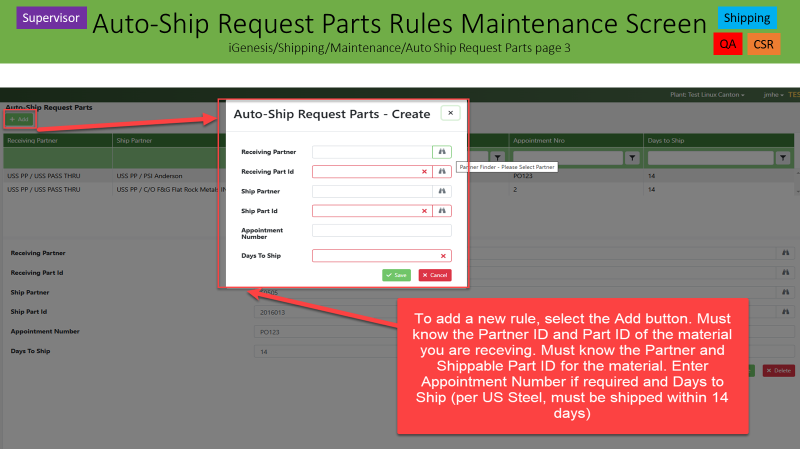
Enter:
- Ship Partner
- Ship Part
- Days To Ship
- Optional Appointment Number
Step 4
Set:
Create Ship Request = Yes
Step 5
Select Save.
You will receive the message:
Auto Pass Through Part updated successfully.
How The Shipping Request Date Is Calculated
The Shipping Request date is calculated using:
Master Coil Receipt Date + Days To Ship
The Shipping Request date is not based on the date the material was processed.
Example
Master Coil Received:
05/09/2026
Days To Ship:
7
Processed Material Released:
05/12/2026
Result
In Plant Date = 05/16/2026
because:
05/09/2026 + 7 Days
How Genesis Decides To Create Or Update A Shipping Request
Same Master Coil Receipt Date
Processed Coil #1:
10,000 lbs
Processed Coil #2:
15,000 lbs
Same Receipt Date:
05/09/2026
Result
Genesis updates the existing Shipping Request.
Total Request Weight = 25,000 lbs
Different Master Coil Receipt Dates
Master Coil A:
Received 05/09/2026
Master Coil B:
Received 05/11/2026
Result
Genesis creates two separate Shipping Requests.
This keeps inventory separated by receipt date.
Appointment Numbers
If an Appointment Number is entered:
TestGH13499
Genesis automatically copies the Appointment Number to each Shipping Request created by that setup rule.
Material On Hold
If material is received:
On Hold
Then:
- No Shipping Request is created.
Once the hold is removed and the material becomes Prime:
- Genesis creates or updates the Shipping Request automatically.
Access
This screen is restricted to:
- CSR Leaders
- Selected Production Supervisors
If access is needed:
- Supervisor must contact IT Help.
Why Use Auto Pass Through Parts?
Auto Pass Through Parts helps reduce manual CSR work by automatically:
- Moving inventory into the correct shipping bucket.
- Creating Shipping Requests.
- Increasing Shipping Request quantities as more material is processed.
- Applying appointment information.
- Improving inventory visibility.
- Improving shipment planning.
- Reducing manual CSR maintenance.
This is especially useful for pass-through customers, storage programs, toll processing, and customer-managed inventory.
Auto Pass Through Parts – Decision Tree
Do you want Genesis to automatically move inventory to a different Partner/Part?
YES
↓
Use Auto Pass Through Parts
↓
What type of material?
Storage / Received Material
↓
Select Trigger:
Storage Material - At Receiving
↓
Enter:
- Ship Partner
- Ship Part
↓
Create Ship Request?
NO
↓
Partner/Part changes only
YES
↓
Enter Days To Ship
↓
Shipping Request created automatically
Processed Material
↓
Select Trigger:
Processed Material - At Processing Coil Release from Scale
↓
Enter:
- Ship Partner
- Ship Part
- Days To Ship
- Optional Appointment Number
↓
Create Ship Request = Yes
↓
Material Released From Scale
↓
Same Master Coil Receipt Date?
YES
↓
Increase Existing Shipping Request
NO
↓
Create New Shipping Request
Was Material Received On Hold?
YES
↓
Do Not Create Request
↓
Wait Until Hold Removed
↓
Create or Increase Request Automatically
NO
↓
Process Normally
End Result
Genesis automatically:
- Updates Partner and Part information.
- Creates Shipping Requests.
- Increases Shipping Request quantities as more material is processed.
- Applies appointment information.
- Moves inventory into the proper shipping bucket.
Bottom Line: Use Auto Pass Through Parts whenever inventory should automatically move into a customer's shipping bucket and Genesis should automatically create or maintain Shipping Requests with minimal CSR involvement.
This was released to a few users in the Canton Plant only November 13, 2024 on Genesis Release 8.2.4. If it works well, more developing will be done to help implement at other Precision Strip Plants.
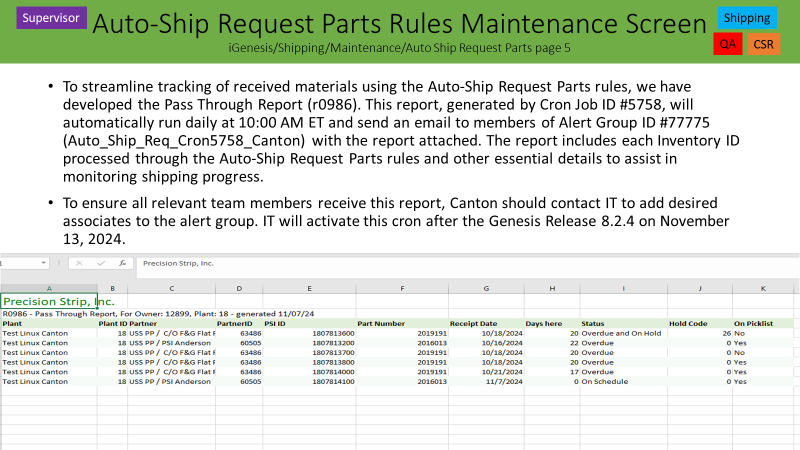
IT Notes only:
TIWO#’s 90057 & 90228/Github#’s 6747 & 7212 - Developers Paxton Caldwell, Derrek Kemper, Jim Lefeld and Derek Rucker- Release 8.2.4 – November 13, 2024
http://psiwiki/Auto-Ship_Request_Parts_z0124
On 5-14-25, Genesis Release 8.2.9, Github Issue 9081 was added in order to not create a shipping request or add to an existing shipping request if the coil is received in on hold. Once the master comes off of hold and deemed prime, the auto ship request will create or increase an existing same part request for the same day. If a coil is on hold at the time of receipt and then comes off of hold a few days later, the auto ship request will create and put number of days to ship from the Receipt Date and not the date the coil came off of hold per Canton's request.
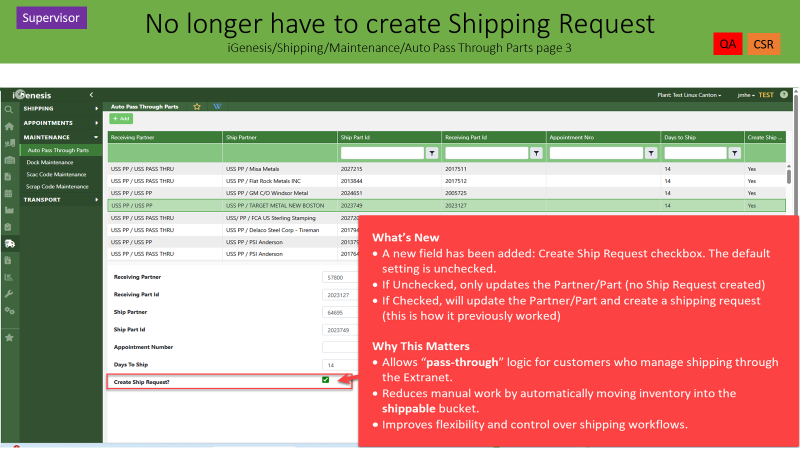
Create Ship Request? Checkbox added September 10,2025
Auto Pass Through Parts – System Update Overview
Summary
The system now supports updating the Partner/Part ID without always creating a Ship Request.
Previous Behavior
The Auto Ship Request Parts screen (now renamed to Auto Pass Through Parts) linked a Receiving Part ID to a Shipping Part ID. When a coil was received:
The system automatically changed the Partner/Part.
A Ship Request was created for a future date.
What’s New
A new field has been added: Create Ship Request checkbox. The default setting is unchecked.
If Unchecked, only updates the Partner/Part (no Ship Request created)
If Checked, will update the Partner/Part and create a shipping request (this is how it previously worked)
Why This Matters
Allows “pass-through” logic for customers who manage shipping through the Extranet. Reduces manual work by automatically moving inventory into the shippable bucket. Improves flexibility and control over shipping workflows.
Additional Notes
- The screen is restricted to Production Supervisors and CSR Leaders. You must contact IT to have access.
IT Information:
Github 10046 – Curtis Schroer and Paxton Caldwell - Release 8.2.13 – September 10, 2025
Github 10705– Curtis Schroer - Release 8.2.14 – October 15, 2025
Github 13499 – Paxton Caldwell - Release 8.2.21 – May 13, 2026
Was this article helpful?
That’s Great!
Thank you for your feedback
Sorry! We couldn't be helpful
Thank you for your feedback
Feedback sent
We appreciate your effort and will try to fix the article